
Transformations
filter, select, cast, with_column, struct, group_by, join, union, sort, distinct and more, applied in the order you write them.
The best open-source data engineering framework
Sparquet standardizes data engineering: ingestion, transformation, quality and delivery live in one declarative JSON contract instead of a thousand bespoke scripts. And because a pipeline is just JSON, an LLM writes it as well as you do: ask the assistant inside Sparquet Studio, or ChatGPT, Claude or Copilot anywhere else, review the diff and run it on any Spark.
Apache 2.0 · No account · Runs on your infrastructure
{
  "name": "orders_curated",
  "input": {
    "format": "delta",
    "path": "sales.orders"
  },
  "transformations": [
    { "type": "filter", "condition": "status = 'CONFIRMED'" },
    { "type": "with_column",
      "column": "revenue",
      "expression": "quantity * unit_price" }
  ],
  "validations": {
    "on_failure": "fail",
    "rules": [{ "type": "not_null", "columns": ["id"] }]
  },
  "output": {
    "format": "delta",
    "path": "analytics.orders",
    "mode": "merge",
    "options": { "merge_keys": ["id"] }
  }
}
A pipeline is JSON, so any model can write one, and the linter proves it before Spark ever starts.
The same contract, as a Job on the Studio canvas
Why it exists
Data teams rarely lack tools, what they lack is a shared shape. Every job invents its own structure, its own naming, its own idea of what "validated" means, until nobody can safely review a pipeline they did not write. Sparquet replaces that with one contract every job obeys.
Source, transformations, quality rules and destinations are fields of the same document. A new engineer reads any pipeline on day one.
A change shows up as a diff a reviewer can reason about, not as archaeology across notebook cells and cluster state.
Parameters turn one contract into every region, date and client. Values change; the logic stays in a single place.
How you build one
The standard is the file. How it gets written is your call, and the three paths are interchangeable, in both directions.
Author the JSON directly. The schema is small enough to keep in your head and strict enough to review in a pull request.
orders_curated.json
{ "type": "filter",
"condition": "status = ..." }
Describe it in plain language, to the assistant inside Studio or to any model you already pay for. The whole language fits in a prompt, so what comes back is valid JSON, not code you have to run to trust.
Any LLM
keep confirmed orders,
upsert revenue per customer
Open Sparquet Studio and build it on a canvas. Nodes are the entries of the file, connections are their order, and the file is what actually runs.
Sparquet Studio
Delta → Filter → Validations
→ Delta (merge)
Import a hand-written file into the canvas, or export a drawn one to git. Nothing is lost either way.
What the standard covers
Twenty transformations, twenty-seven connectors and a data quality engine, every one of them documented, typed in the editor and understood by the assistant.
filter, select, cast, with_column, struct, group_by, join, union, sort, distinct and more, applied in the order you write them.
Null, uniqueness, range, regex, row count, SQL invariants and schema checks, with fail / warn / skip policies and a per-rule report.
Lakehouse tables, files, relational databases, warehouses, NoSQL, search and streams, the same node model for all of them.
Route the rows that fail a rule to their own destination, so the clean set ships while the bad set stays inspectable.
One file, many runs: {param} placeholders formatted for SQL, and skip_if_false to switch whole steps on and off per execution.
collect a key set into a {{variable}} and push it into a later read as a literal IN (...), data skipping without hand-written glue.
One DataFrame, many shapes: per-destination transformations and column projections in a single pass over the data.
Register your own readers, writers, transformations and validators. Studio keeps unknown node types intact when it opens the file.
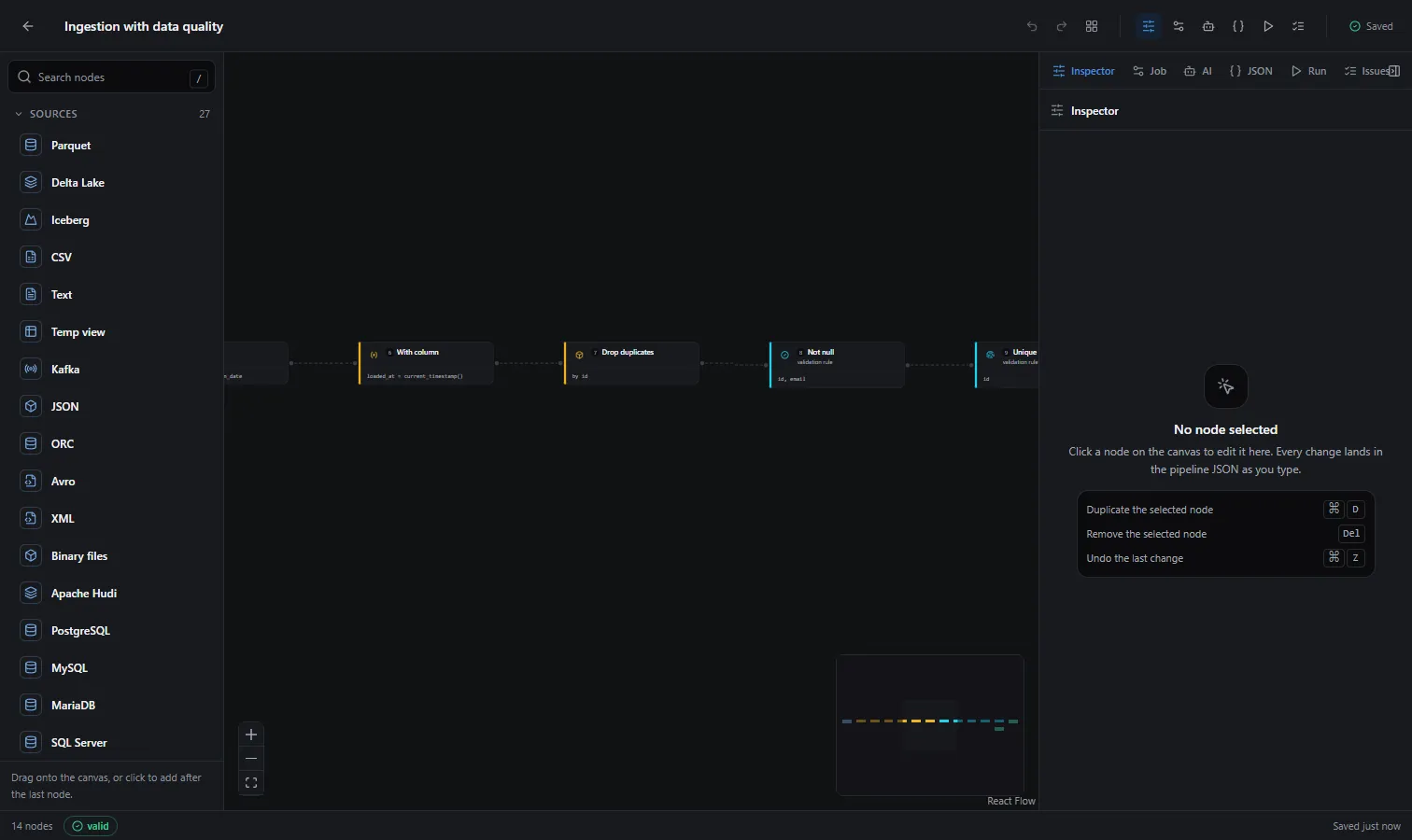
Sparquet Studio
Studio is where the contract becomes something a team can see. Drag a source, connect transformations, wire a destination, then press ⌘J and read the exact JSON that will run. No proprietary project format, no hidden generation step.
AI-native by design
Ask a model for a PySpark job and you get a script nobody can verify without running it on real data. Ask for a Sparquet pipeline and you get a short JSON document: every field exists in the catalog, the linter checks it in place, and the diff is reviewable line by line. Studio ships an assistant that uses your own key, and any model outside it works just as well, because the entire language fits in a prompt.
Read orders from the Delta table sales.orders, keep the confirmed ones, drop duplicates by id, fail the run if id has nulls, and upsert revenue per customer into analytics.customer_revenue
Proposed a Job with 6 nodes · 1 destination · 2 quality rules
anthropic · openai · google · openai-compatible
Connectors
Swapping where the data comes from is a field, not a rewrite. The same node model covers lakehouse tables, plain files, operational databases, warehouses, NoSQL stores and streams.
27 totalSee every connector →
Where it runs
Sparquet is a library, not a platform. There is no control plane, no hosted runtime, and nothing phones home.
A laptop with PySpark installed, for development and tests.
Reuses the active session; jobs and notebooks work unchanged.
Submit it like any other PySpark application.
Detected automatically, like every other supported environment.
Questions
Short answers, with the long version a click away in the documentation.
Sparquet is an open-source data engineering framework for Apache Spark. A pipeline is a single declarative JSON file that says where the data comes from, how it is transformed, which quality rules it must pass and where it is written. The framework reads that file and executes it with PySpark, on your own cluster.
A hand-written job encodes the same five decisions in a different shape every time, so reviewing a pipeline you did not write turns into archaeology. Sparquet fixes the shape: any engineer reads any pipeline, a change shows up as a readable diff, and the parts that never vary, session handling, merges, quality reporting, multiple destinations, are already written and tested.
Yes, and the format is what makes it work. The entire language, twenty transformations and twenty-seven connectors, fits inside a prompt, so a model returns a complete pipeline as JSON instead of a script you can only trust by running it. Sparquet Studio ships an assistant that uses your own API key, and any model outside it works the same way. Whatever comes back is linted against the real catalog before Spark ever starts.
Anywhere Spark runs: Databricks, Amazon EMR, Google Dataproc, Azure Synapse, a Kubernetes cluster, or your laptop. The framework detects the environment and reuses the active Spark session when there is one, so the same file moves between them untouched.
Twenty-seven connectors, read and write, under one node model: Delta Lake, Apache Iceberg, Apache Hudi, Parquet, CSV, JSON, ORC, Avro, XML, plain text, PostgreSQL, MySQL, MariaDB, SQL Server, Oracle, BigQuery, Snowflake, Redshift, MongoDB, DocumentDB, DynamoDB, Cassandra, Elasticsearch, OpenSearch, Kafka and Spark temp views.
No. Studio is the visual editor for the same JSON files, and it is optional in both directions: import a hand-written pipeline onto the canvas, or export a drawn one to git. The framework runs the file with or without it.
Sparquet is free and open source under the Apache 2.0 license. Install it with pip install sparquet and it runs on your own infrastructure. There is no account, no hosted service and no telemetry, and the data never leaves your cluster.
Install the framework, open the studio, and run a real job before your coffee gets cold.
pip install sparquet